Last week I wrote about running a 397-billion-parameter model on 20 GPUs. Before that run, the same code had to work on something much smaller: a half-billion-parameter model split across two workers, on a CPU, on my Mac's GPU and on two NVIDIA cards.
That small test is a better place to explain the basics. What does a model compute for each token? Why does a GPU do it faster than a CPU? And what is CUDA, apart from a word in an error message? This post takes those in order, with the numbers I measured.
If you want the hardware background first, CPU, GPU and CUDA Fundamentals for Engineers covers how a CPU core, a GPU and a CUDA kernel work, with Rust examples.
What a Model Is When It Runs
A language model predicts the next token from the tokens before it. A token is a piece of text: a word, part of a word or a punctuation mark. A tokenizer turns text into token IDs, which are plain integers.
The model itself is a file of numbers called weights. Training set those numbers. Running the model, which is called inference, only reads them. The model I tested is Qwen2.5-0.5B-Instruct:
- 494 million weights
- 24 layers
- 896 numbers to represent each token inside the model (the hidden width)
- a vocabulary of 151,936 tokens
Stored at 32 bits per weight, that is 1.98 GB. The quantized copy I used, a format called Q4_K_M that keeps most weights in about 4 bits, is 398 MB.
One Token, Step by Step
- Embedding. Look up the token's row in a table. The row is 896 numbers.
- Layers. Pass those 896 numbers through 24 layers. Each layer first reads from the earlier tokens (attention), then transforms the result (the feed-forward network).
- Projection. Multiply the final 896 numbers by a matrix of 151,936 rows to get one score for every token in the vocabulary.
- Selection. Take the token with the highest score. Other systems pick at random in proportion to the scores; my project always takes the highest.
- Add that token to the text and go back to step 1.
Two terms come up in every benchmark. Prefill is the first pass over the whole prompt. Decode is every step after that, one token at a time. Within one conversation, decode steps cannot run at the same time, because each token depends on the one before it.
The KV cache is what keeps decode cheap. Each layer saves what it computed about every earlier token, so a decode step only does the work for the new one. The cache grows with the conversation and takes memory on top of the weights.
It Is Almost All Matrix Multiplication
Count the weights in one layer of this model:
| Part of a layer | Weights |
|---|---|
| Attention (four matrices) | 1.8 million |
| Feed-forward (three matrices of 896 × 4,864) | 13.1 million |
| One layer | 14.9 million |
Twenty-four layers come to 358 million. The projection matrix in step 3 is 151,936 × 896, another 136 million. Together that is the 494 million.
During decode, each of those weights is used about once per token, in one multiplication and one addition. So a token costs roughly half a billion multiply-adds. In a model this small, more than a quarter of them go into step 3, scoring every token in the vocabulary.
The important part is that it is the same list of multiply-adds every time, in the same order, with nothing to decide along the way. That is the kind of work a GPU was built for.
What a CPU Does With That
A CPU has a small number of fast cores, designed for code that branches and jumps around. Each core can do a few multiply-adds at once with vector instructions. For this workload it has two limits:
- Few cores. Only so many multiply-adds can happen at the same moment.
- Memory. A CPU's cache holds tens of megabytes. The weights are 1.98 GB, so for every token they are read again from main memory, which is much slower than the cache.
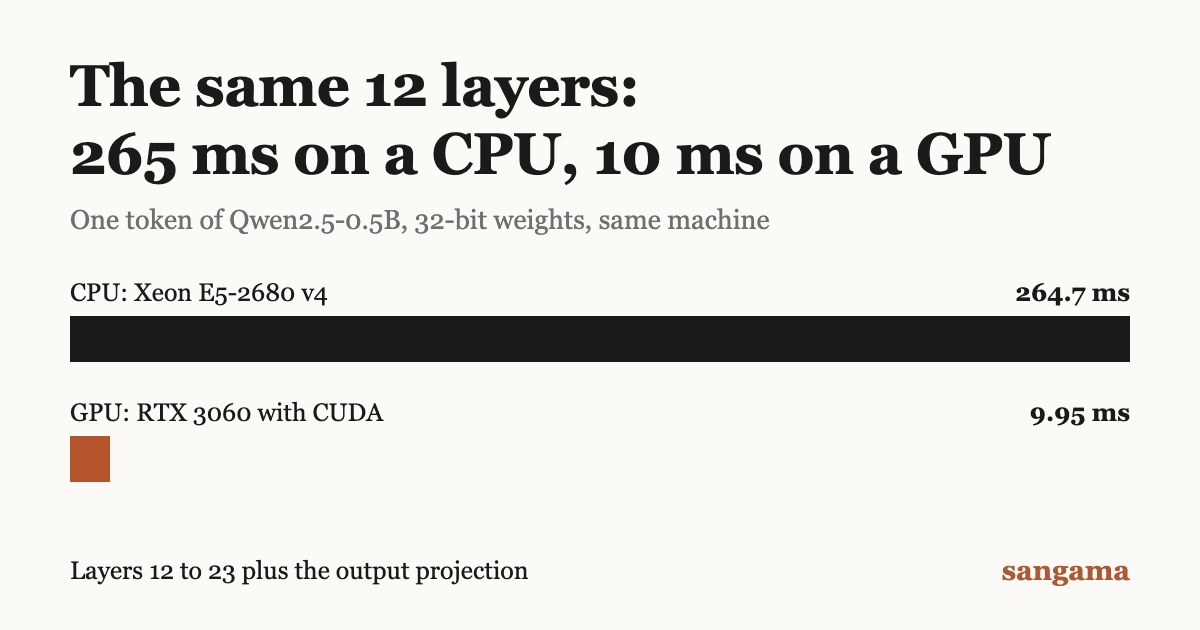
My test machine was a rented server with a Xeon E5-2680 v4 (56 threads), 251 GB of RAM and two RTX 3060 cards with 12 GB each. I ran the second half of the model, layers 12 to 23 plus the projection, in three ways with the same 32-bit weights:
| Where the second half ran | Engine | Time for one token |
|---|---|---|
| Xeon E5-2680 v4 | Candle | 264.7 ms |
| RTX 3060, CUDA | Candle | 9.95 ms |
| RTX 3060, CUDA | llama.cpp | 4.57 ms |
Same engine, same weights, same machine: the GPU was about 27 times faster. Each figure is the timing of a single token from one run, on one old server chip, so read it as a rough ratio. I did not test llama.cpp on that CPU, and I did not test a newer CPU.
What a GPU Does Differently
A GPU has thousands of simple cores that all run the same small function on different numbers at the same time. It was designed for pixels, where every pixel gets the same calculation. A matrix multiplication has the same shape.
It also has its own memory, built to move large blocks of numbers quickly. The weights are copied into that memory once, when the model loads, and stay there. This is why GPU memory is the figure people quote first: the weights and the KV cache have to fit in it. On the 12 GB cards here, a worker reported 9,533 MiB free.
The CPU is still in charge. It reads the file, copies the weights across, sends in each token and tells the GPU which function to run next. The GPU does the arithmetic.
A Mac with Apple Silicon is a different arrangement. The GPU shares the machine's main memory, so there is no separate GPU memory to fill. There is still a limit: on my 24 GB M5 Pro, the system let one process use about 74% of RAM for the GPU.
What CUDA Is
CUDA is NVIDIA's software for running ordinary computation on its graphics cards. Four pieces of it mattered in this test:
- Driver. Installed on the host. It talks to the card.
- Toolkit. The compiler and libraries used to build GPU code.
- Kernel. A small function the GPU runs across many numbers in parallel. A matrix multiplication is a kernel. It has nothing to do with the operating system's kernel.
- Context. The driver's record of one program's state on one GPU: its memory and its loaded kernels.
On a CPU you can ignore all of this, because there is no equivalent. On CUDA, three things happened in this test that a CPU program never sees.
The Toolkit Must Not Be Newer Than the Driver
Candle, the Rust library I use, compiles its kernels when the program is built, into an intermediate format called PTX. When the program starts, the driver turns that PTX into code for the actual card. A driver only accepts PTX versions up to its own release.
The GPU box was a rented container. The driver belonged to the host: version 550.144, which supports CUDA 12.4. The toolkit came from the container image: 12.8. The build succeeded. The worker then refused to start:
CUDA_ERROR_UNSUPPORTED_PTX_VERSION
Installing toolkit 12.4 fixed it. The rule is to check the CUDA version that nvidia-smi reports and build with a toolkit no newer than that. The worker now prints that advice when it sees this error.
The First Run Is Slow
The first generation on the Candle CUDA workers took 10.8 seconds to produce its first token. The second took 107 ms. The difference was kernels being compiled for the card the first time they loaded. Vulkan, another way to use the same cards, did the same thing while it compiled its shaders: 2.7 seconds, then 55 ms.
So measure the second run, and expect the first request to a new worker to be slow.
A Context Belongs to a Thread
A thread has to make a CUDA context current before it can call CUDA. My worker handles requests on a pool of threads, so a request runs on whichever thread is free.
The first conversation worked. When it ended, the worker freed that conversation's KV cache on a thread with no context bound. The free failed with CUDA_ERROR_INVALID_CONTEXT, and the Rust CUDA binding then returned that same error from every later call. Every conversation after the first failed.
My earlier tests missed it because the test runner started fresh workers for every scenario. The fix is to bind the context on the current thread before each forward pass and before clearing the cache. Simplified:
fn bind(&self) -> Result<()> {
    if let Device::Cuda(device) = &self.device {
        device.cuda_stream().context().bind_to_thread()?;
    }
    Ok(())
}
Five conversations in a row then passed on the same workers. On a CPU, memory allocated on one thread can be freed on any other, so this bug cannot happen there.
Same Card, Different Software
I ran the model through two engines, Candle and llama.cpp, with each half of the model on its own GPU. The prompt was 30 tokens and the first-token time includes it.
| Route (first half, second half) | Weights | First token | Decode |
|---|---|---|---|
| Candle CUDA, Candle CUDA | 32-bit | 107 ms | 55 tok/s |
| llama.cpp CUDA, llama.cpp CUDA | 32-bit | 295 ms | 103 tok/s |
| llama.cpp Vulkan, llama.cpp Vulkan | 32-bit | 55 ms | 106 tok/s |
| llama.cpp CUDA, llama.cpp CUDA | Q4_K_M | 106 ms | 220 tok/s |
| llama.cpp CUDA, Candle CPU | 32-bit | 491 ms | 3.7 tok/s |
- The engine matters as much as the card. llama.cpp decoded about twice as fast as Candle on the same GPUs with the same weights.
- CUDA is not the only way to use an NVIDIA card. Vulkan matched it here. Vulkan also runs on AMD and Intel GPUs, though I have only tested it on NVIDIA.
- Quantized weights doubled the speed again. There is a fifth as much weight data to read for each token.
- One slow half sets the pace. With the second half on the CPU, the whole route ran at 3.7 tokens per second.
I have not looked into why llama.cpp on CUDA took longer to reach its first token than the other two.
Do a CPU and a GPU Give the Same Answer?
With 32-bit weights, yes, in every combination I tried. Candle and llama.cpp on a CPU, on Metal, on CUDA and on Vulkan, mixed in any order within one route, chose the same 20 tokens for the same prompt. The check was on the tokens chosen, for one prompt.
With quantized weights, no:
- The same Q4_K_M file produced different text on CUDA than on Metal, because each backend has its own kernels for quantized matrices. Both answers were sensible sentences.
- Quantizing the same 32-bit file on the Mac and on the Linux box produced two different files. The 32-bit conversion was byte-identical on both.
So a quantized setup is only repeatable with one file on one kind of backend. My workers now report the hash of their weights file and refuse to join a route that mixes precisions or files.
Mixing a CPU and a GPU in One Route
Between the two halves, the worker sends the 896 numbers for the current token as 32-bit floats: 3,584 bytes. Those bytes mean the same thing on any device. That is why one half can run on CUDA and the other on a CPU or a Mac.
Once the halves are in different places, the hardware stops mattering much. With the first half on my Mac at home and the second on the GPU box in the US, decode ran at 3.1 tokens per second: about 320 ms per token, on a link whose median round trip was 371 ms. The GPU's 10 ms disappears next to that.
That is the problem the 397B post is about. On one machine, the question is CPU or GPU. Across machines, it is the network.
The full results for this test are on the project site under a small model across CPUs, GPUs and the Internet. The code is open source under the MIT licence on GitHub.
Comments
Have thoughts on this post? Join the discussion below! Comments are powered by Disqus.