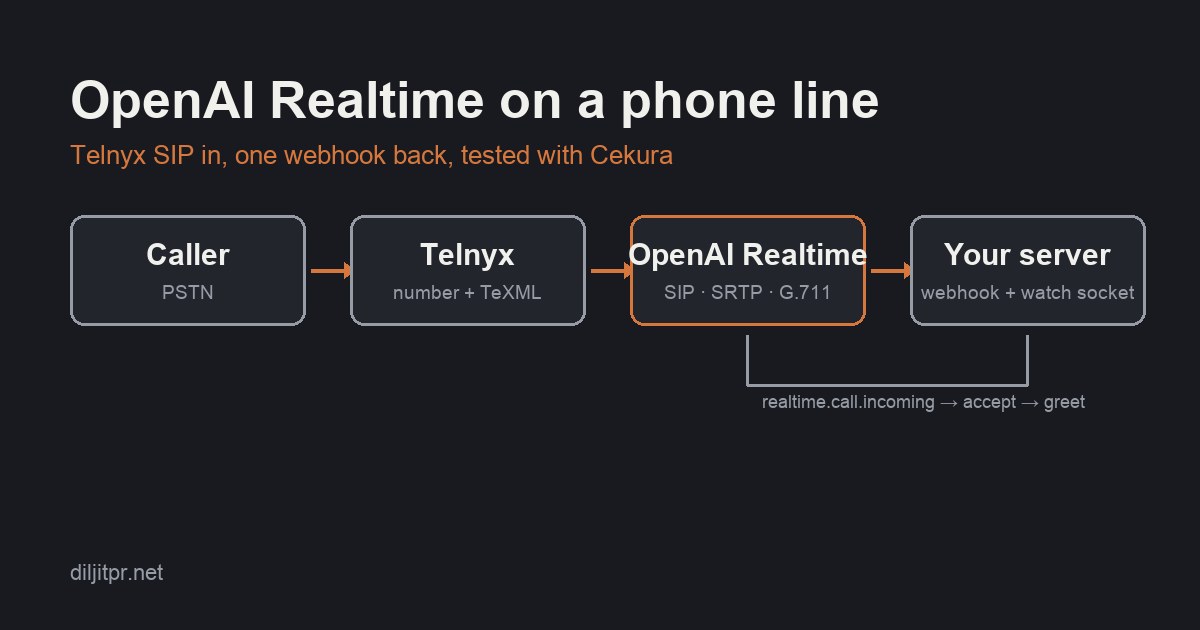
Most phone voice agents are a pipeline: speech-to-text, a text model, text-to-speech, and a lot of glue code to make the three hand off quickly. The OpenAI Realtime API replaces that pipeline with one speech-to-speech model, gpt-realtime. Its SIP support means you can put the model on a phone number without handling audio yourself. This post is the integration I wish I had read first. It covers connecting a Telnyx number to OpenAI Realtime over SIP, the four traps that produce a call with no audio, the prompt rules a speech-to-speech model needs, and a repeatable way to test the result with Cekura's simulated callers.
Everything here is provider documentation plus what the logs taught me. Where I give a setting, it is because the default did something surprising on a real call. If you are new to structuring prompts for models like this, the anatomy of a great prompt is the background for the prompt section.
Why SIP instead of media streaming
There are two ways to connect a carrier to a realtime model. With media streaming, the carrier sends you raw audio frames over a WebSocket. You forward them to the model and send the model's audio back. You own the bridge, so you own buffering, codec matching, barge-in, and every reconnect. With SIP, the carrier dials the model's SIP endpoint directly. Audio flows carrier-to-OpenAI. Your server only answers a webhook that asks "how should I handle this call?" and, optionally, watches the session over a WebSocket.
SIP is the right first step. It answers the question that matters, whether the model is good enough on a real phone line, with a fraction of the code. If the answer is yes, you can graduate to media streaming later to add tool calls the model can drive.
caller ──PSTN──▶ Telnyx number ──TeXML app──▶ <Dial><Sip>sip:proj_…@sip.api.openai.com;transport=tls;secure=srtp
                                                                  │
                    POST /webhooks/openai  ◀── realtime.call.incoming ┘
                    └─▶ POST /v1/realtime/calls/{id}/accept   (instructions, model, voice, audio format)
                    └─▶ wss://api.openai.com/v1/realtime?call_id=…   (greeting, then watch and log)
The OpenAI side: project, webhook, accept
OpenAI routes SIP calls by project. The SIP address is sip:<PROJECT_ID>@sip.api.openai.com;transport=tls, where the project id is the proj_… value from the dashboard URL. Two things must be true before a call will work: the API key you use to accept calls belongs to that same project, and the project has a webhook subscribed to the realtime.call.incoming event. Webhooks are created in the dashboard under project settings; there is no API for it yet. Save the signing secret when it is shown, because it is shown once.
When a call arrives, OpenAI posts an event like this to your webhook URL:
{
  "id": "evt_…",
  "type": "realtime.call.incoming",
  "data": {
    "call_id": "rtc_…",
    "sip_headers": [
      { "name": "From", "value": "\"+15125550142\" <sip:[email protected]>" },
      { "name": "To",   "value": "sip:proj_…@sip.api.openai.com" }
    ]
  }
}
Your handler verifies the signature, then accepts the call with a session configuration. The accept body is the same shape as a Realtime session. Three fields are required: type, model, and instructions. The model is one of the gpt-realtime family. Set the audio format explicitly; more on why below.
POST https://api.openai.com/v1/realtime/calls/{call_id}/accept
Authorization: Bearer $OPENAI_API_KEY
Content-Type: application/json

{
  "type": "realtime",
  "model": "gpt-realtime",
  "instructions": "…the agent's full prompt…",
  "audio": {
    "input":  { "format": { "type": "audio/pcmu" },
                "transcription": { "model": "gpt-4o-mini-transcribe", "language": "en" },
                "turn_detection": { "type": "server_vad", "silence_duration_ms": 800 } },
    "output": { "format": { "type": "audio/pcmu" }, "voice": "marin" }
  }
}
A 200 means the SIP leg is being answered. The model will not speak until either the caller does or you ask it to, which is why the next piece exists.
Verifying the webhook without an SDK
OpenAI signs webhooks with the Standard Webhooks scheme. If you already have that verifier for your own outgoing webhooks, reuse it. If not, it is a dozen lines: the signed content is id.timestamp.body, the key is the base64 part after whsec_, and the signature header carries one or more v1,<base64> values.
import { createHmac, timingSafeEqual } from "node:crypto";

export function verifyOpenAiWebhook(secret: string, headers: Headers, rawBody: string, toleranceSec = 300): boolean {
  const id = headers.get("webhook-id"), ts = headers.get("webhook-timestamp"), sig = headers.get("webhook-signature");
  if (!id || !ts || !sig) return false;
  if (Math.abs(Date.now() / 1000 - Number(ts)) > toleranceSec) return false;
  const key = Buffer.from(secret.replace(/^whsec_/, ""), "base64");
  const expected = `v1,${createHmac("sha256", key).update(`${id}.${ts}.${rawBody}`).digest("base64")}`;
  return sig.split(" ").some((c) => c.length === expected.length && timingSafeEqual(Buffer.from(c), Buffer.from(expected)));
}
Read the body as raw text before parsing. The signature covers the exact bytes, and a framework that parses JSON for you will quietly break verification.
The Telnyx side: a TeXML application and three settings that are not optional
On Telnyx, the simplest way to send a number to a SIP address is a TeXML application. Its voice URL returns instructions when a call arrives; the instructions are a single <Dial> with a <Sip> noun. Passing the caller's number as callerId puts it in the SIP From header, which is how your webhook learns who is calling.
<?xml version="1.0" encoding="UTF-8"?>
<Response>
  <Dial callerId="+15125550142">
    <Sip>sip:proj_…@sip.api.openai.com;transport=tls;secure=srtp</Sip>
  </Dial>
</Response>
Three settings turned a dead line into a working one. None of them is in the getting-started path.
- An outbound voice profile on the TeXML application. A
<Dial>is an outbound leg, even to a SIP address. Without a profile the inbound call ends after about a second, no child leg appears in the call log, and OpenAI never sees anything. The hangup cause reads "unspecified", which is no help at all. - Codecs limited to G.711 (PCMU and PCMA). OpenAI's SIP side speaks G.711. Leaving wideband codecs in the offer invites a negotiation you do not want to debug.
;secure=srtpon the SIP URI. OpenAI's media is SRTP. Telnyx offers plain RTP by default, OpenAI accepts it inbound, and the encrypted return stream never decodes. The symptom is the strangest one in this post: the model hears the caller, transcribes every word, replies on time, and the caller hears silence. Telnyx's per-endpointsecureparameter requests SRTP for that leg.
Set the session audio format, or the model hears noise
A Realtime session defaults to 24 kHz PCM. A phone call is 8 kHz G.711. When I left the default in place, the caller's English came through the input transcription as Malayalam, Hindi, and fragments, and the model answered in Japanese. Declaring audio/pcmu on both input and output in the accept body fixed the input, and the model's output audio started reaching the phone. Declare it even though the SIP leg negotiates its own codec; the two are separate layers.
Watching the call: the WebSocket and the greeting
After accepting, you can attach to the session with wss://api.openai.com/v1/realtime?call_id=… and an Authorization header. You use it for two things: asking the model to speak first, and logging what happens.
Two details cost me an afternoon. First, a bundled ws package silently lost its buffer helper under my bundler and threw "mask is not a function" on every send, while receiving still worked. The greeting request never left the process, and the logs looked fine. Node's built-in WebSocket accepts request headers as an init option and has no such failure mode.
const ws = new WebSocket(`wss://api.openai.com/v1/realtime?call_id=${encodeURIComponent(callId)}`, {
  headers: { authorization: `Bearer ${apiKey}`, origin: "https://api.openai.com" },
} as never);

ws.addEventListener("open", () => {
  // Asked for the instant the socket opens, the first syllables were clipped before the media path was up.
  setTimeout(() => ws.send(JSON.stringify({
    type: "response.create",
    response: { instructions: `Say exactly this, in English, word for word, then wait: ${greeting}` },
  })), 600);
});
Second, requesting the greeting the instant the socket opens clips its first syllables; callers heard "for calling Northwind Dental" rather than "Thanks for calling Northwind Dental". A short settle delay before the request keeps the opening intact. Re-send the request if no response.created arrives within a couple of seconds; a request that lands while the SIP leg is still being answered can be dropped.
For logging, the useful events are input_audio_buffer.speech_stopped, conversation.item.input_audio_transcription.completed, response.output_audio_transcript.delta, response.output_audio_transcript.done, and response.done. One surprise: on a SIP call the audio itself never crosses this socket, so response.output_audio.delta never fires. If you want a reply-latency number, time from speech_stopped to the first transcript delta, which rides alongside the audio. And remember that server VAD's silence window sits inside that number.
Prompt rules a speech-to-speech model needs
A prompt written for a text model behind a transcriber has assumptions baked in that a speech-to-speech model breaks. Four rules fixed real failures.
- Pin the language, at both ends of the prompt. "Detect the caller's language from their first sentence" is a fine rule for a text model. On 8 kHz audio it produced a greeting in Arabic before the caller had said a word, and a Japanese reply to "hello, how are you". State the language plainly, tell the model not to switch on noise, a single word, or an accent, and put the rule first and last, where models attend most.
- Add a pause rule. A caller who says "And for a…" and thinks for a second is not done. Without an explicit rule the model answers the fragment and may even start closing the call. "If the caller stops mid-sentence, stay silent and let them finish" is enough, combined with a slightly longer VAD silence window.
- Any operational note you add will be read aloud. I appended a note saying tools were not connected on this call. The model told a caller "since this is a pilot call with no tools, I can take a message instead". Every internal note needs "never mention this to the caller".
- Fill your template variables yourself. If your prompt has placeholders that another runtime normally substitutes at call start, the model will speak them: "Thanks for calling
{{business_name}}". Render them before accept, and blank unknown ones rather than leaving braces in.
Turn detection is a dial, not a checkbox
The Realtime API offers two turn detectors. Server VAD declares a turn over after a fixed silence window; it is fast and it does not care whether the sentence was finished. Semantic VAD also considers whether the phrase sounds complete, with an eagerness setting from low to high; it protects mid-sentence pauses and it adds noticeable wait after every turn. In my calls the most useful combination was server VAD with a longer silence window and the pause rule in the prompt: the rule does the semantic job at the model layer without the detector's deliberation on every turn. Test both on a scenario with a deliberate thinking pause before you decide; the difference is easy to hear and easy to measure.
Testing with Cekura's simulated callers
Once the line works, "does it sound right to me" stops being a test. Cekura places real PSTN calls to your number from a scripted caller, records both sides, and scores the call against an expected outcome. I covered how to think about voice evals in the field guide to evals for voice agents and the metrics post, and the short version is in the dummy's guide to evals. This is the mechanical loop that applies them to a speech-to-speech agent over OpenAI Realtime.
The setup is one test agent that dials your number with agent_speaks_first enabled, so the caller waits for the greeting, and a small set of scenarios. Three cover most of what a phone agent gets wrong:
- A plain service enquiry that must be answered specifically, with an expected outcome that also forbids inventing a booking or a callback.
- An interruption: the caller cuts in during a long answer using Cekura's
<interruption time="0.7s" />tag, with the outcome requiring that overlap actually occurred, that the agent stopped, and that it answered the new question. - A thinking pause: the caller says "And for a", holds with
<hold time="1.2s" />, then finishes the question. The outcome checks that the agent did not answer the fragment or talk over the continuation.
Scenarios are conditional-action scripts: each step has a condition the caller waits for ("the agent has answered the check-up price question") and a fixed message to say next, with a recovery step for when the agent missed the question. Write the expected outcome so that missing coverage cannot pass; "if no overlap occurred, mark interruption coverage unverified" is the kind of sentence that keeps the score honest.
Running and reading results is two API calls, which makes the loop scriptable:
POST https://api.cekura.ai/test_framework/v1/scenarios/run_scenarios/
X-CEKURA-API-KEY: …
{ "scenarios": [101, 102, 103], "agent_id": 42, "frequency": 1, "concurrency_limit": 1, "name": "round-3" }

GET  https://api.cekura.ai/test_framework/v2/runs/bulk/?run_ids=…
→ per run: status, transcript with timestamps, and metrics including Expected Outcome (0–5),
  Latency (in ms) with per-turn samples, Interruption Score, Stop Time after User Interruption,
  AI interrupting user, Infrastructure Issues, and a recording
Then the loop is boring on purpose. Run the three. Read the transcript for every run, not only the failed ones. Change one thing, redeploy, run again. Treat a configuration as settled only when it passes every scenario twice in a row. The transcript is where the real findings live. The scorer passed one thinking-pause call even though the agent had said "Got it, no problem" into the pause. The transcript showed it, and a later round failed the same scenario outright. Reading the pass told me what to fix before it became a failure.
Two habits make the loop trustworthy. Keep a ledger with one row per run: configuration, outcome score, latency samples, stop time after interruption. And log your own per-turn numbers from the WebSocket alongside Cekura's, because they measure different spans. Cekura times audio on the line; your log times the model. When both move together you have a real change. When only one moves you have a measurement artefact.
What the loop produced
Numbers from one weekend of this loop, on a receptionist prompt for a dental clinic, three scenarios per round, one real call per scenario. They are too few calls to be a benchmark. They are enough to show what each knob does, which is what a loop like this is for. "Reply" is Cekura's measurement from the caller's last audio to the agent's first audio, so the turn detector's silence window is inside it. "Stop" is how long the agent kept talking after the caller interrupted.
| Configuration | Scenarios passed | Reply, mean per call | Stop after interruption | What the transcripts showed |
|---|---|---|---|---|
| Server VAD, 500 ms default, no pause rule (two rounds) | 5 of 6 | 1.1–1.6 s | 430–450 ms | Fastest, and it answered "And for a…" as a complete question in one of two pause runs, then started closing the call |
| Semantic VAD, auto eagerness, pause rule | 3 of 3 | 3.2–4.2 s | 330 ms | Pause honoured; every turn waited noticeably |
| Semantic VAD, high eagerness, pause rule | 3 of 3 | 2.6–3.2 s | 350 ms | Pause honoured; still a beat too slow for a phone call |
| Server VAD, 800 ms window, pause rule (two rounds) | 6 of 6 | 1.5–2.0 s | 250–400 ms | Pause honoured, greeting intact, one half-second overlap in six calls |
| Conventional pipeline on the same number and prompt: transcriber, text model, voice | 3 of 3 | 0.9–2.0 s | about 1,000 ms | Passed every outcome and spoke over the caller in every call; part of its speed is answering before the caller finished |
Three things I took from the table. The prompt-level pause rule with a slightly longer VAD window did the job semantic VAD was meant to do, at half the wait. The speech-to-speech model's real advantage was not raw speed but turn-taking: it stopped within half a second when interrupted and it let the caller finish, where the pipeline talked over them and took a full second to yield. And the outcome scorer alone would have hidden the first two findings; the transcripts and the per-turn latencies are where the decisions came from.
What I learned
- The defaults are wrong for a phone line in five separate places. Outbound voice profile, codec list and SRTP on the carrier side; session audio format and turn detection on the model side. Each produces a distinct symptom, and one of them, one-way audio with a perfect transcript, looks like everything is working.
- A speech-to-speech model needs a different prompt than a text model. Language rules that are harmless behind a transcriber produce the wrong language on 8 kHz audio. Every operational note is read aloud. Placeholders are spoken as braces. A mid-sentence pause gets answered unless the prompt says to wait.
- A pause rule plus a longer silence window beat semantic turn detection. Semantic VAD did the right thing and added one to three seconds to every turn. One sentence in the prompt and an 800 ms window gave the same behaviour at a phone-call pace.
- The model's real advantage was turn-taking, not speed. Against a conventional pipeline on the same prompt it was equal on outcomes, slower to the first word on simple questions, and far better at letting the caller finish and stopping when interrupted. That is the difference callers notice.
- Read the passing transcripts. The scorer passed a call where the agent had spoken into the thinking pause. The transcript showed it, and a later round failed on exactly that. Every fix in this post came from a transcript or a raw log line, not from a score.
- A bundler can break sends while receives keep working. The WebSocket library threw on every send, the greeting never left the process, and the logs looked healthy because everything inbound still flowed. Use the runtime's own WebSocket, and log the send path.
- An event that never arrives is the diagnosis. The missing SIP leg, the missing webhook, and the missing greeting were each found by noticing which event did not happen, not by an error message. Count event types per call and print the counts on hangup.
A debugging table for the first day
| Symptom | Cause | Fix |
|---|---|---|
| Call ends after about a second, no webhook | TeXML app has no outbound voice profile, so the Dial never leaves | Attach an outbound voice profile to the application |
| Webhook fires, accept returns 404 | API key belongs to a different project than the SIP address | Use a key from the project in the SIP URI |
| Transcript is perfect, caller hears silence | Plain RTP offered, SRTP returned | Add ;secure=srtp to the SIP URI, keep transport=tls |
| Caller's English transcribed as other languages, replies in a random language | Session audio format left at 24 kHz PCM on an 8 kHz line | Declare audio/pcmu on input and output; pin the language in the prompt |
| Agent never speaks first | Greeting request never sent, or sent before the leg was answered | Check the socket send path for a thrown error; delay and retry the request |
| Greeting missing its first word | Audio requested before the media path settled | Add a few hundred milliseconds before the greeting request |
| Agent answers half a sentence | Silence window too short, no pause rule | Lengthen the VAD window, add the pause rule, or try semantic VAD |
FAQ
Does OpenAI Realtime support inbound phone calls directly? Yes. Point a SIP trunk at sip:<PROJECT_ID>@sip.api.openai.com;transport=tls, subscribe a project webhook to realtime.call.incoming, and accept each call with a session configuration. There is also a European endpoint at sip-eu.api.openai.com.
Do I need to handle audio in my own code? Not with SIP. Audio flows between the carrier and OpenAI. Your server answers the webhook and can watch the session over a WebSocket, but it never receives or sends audio frames.
Why does the model hear the caller but the caller hears nothing? Almost always SRTP. OpenAI's media is encrypted; if the carrier offers plain RTP, inbound works and the return stream does not decode. On Telnyx, add ;secure=srtp to the SIP URI.
Can the model call tools over SIP? The session supports function calling, but on SIP your server only sees the events over the watch socket; wiring tool results back is possible there, and a media-streaming bridge gives you more control. Prove the voice quality over SIP first.
How do I test a phone agent without calling it myself all day? Use a simulated-caller service such as Cekura: scripted scenarios with interruption and hold tags, real PSTN calls, and scored transcripts you can fetch by API and loop on.
Further reading
- OpenAI: Realtime API with SIP, the accept, reject, refer, and hangup endpoints.
- OpenAI: Webhooks, signing scheme and event types.
- Telnyx: TeXML Dial, the
<Sip>noun andcallerId. - Cekura: run evaluators by voice.
- What are evals? A voice agent example, if the testing section moved faster than you wanted.
Comments
Have thoughts on this post? Join the discussion below! Comments are powered by Disqus.